
Most people look at a QR code and see a small pattern of squares. But that small pattern can carry a menu, a business card, a WhatsApp chat, a payment instruction, a school form, a product page, an event registration link, a property brochure, a video, a location map, or an entire company profile. It can turn a flyer into a website visit, a product label into a customer support page, a church program into a donation link, and a restaurant table into a digital menu. That is the quiet power of a QR code: it helps people move from what they see in the physical world to what they need in the digital world, almost instantly.
What Is QR Code in Simple Words?
A QR code is a scannable code that opens information on a phone.
When you scan a QR code with your phone camera or QR scanner, it can take you to a website, WhatsApp chat, PDF, menu, Google Form, payment instruction, contact card, social media page, product information, location map, video, or online profile.
That is the simplest answer to the question, “What is QR code?”
A QR code is a shortcut. Instead of asking someone to type a long web address, search for your business online, save your phone number manually, or wait for you to send a link, you can place the information inside a code they can scan.
For individuals, this can make sharing easier. For businesses, it can make customer action faster. For schools, churches, event planners, restaurants, real estate agents, NGOs, shops, and organizations, it can reduce stress, save time, and make printed materials more useful.
What Does QR Code Mean?
QR code means Quick Response code.
The name explains the purpose. A QR code helps people respond quickly. Someone sees the code, scans it, and reaches the information or action connected to it.
For example, instead of printing a long link such as:
https://www.yourbusiness.com/products/latest-catalogue
you can place a QR code on your flyer. A customer scans the code and opens the catalogue immediately.
That small convenience matters. Many people do not want to type long links. Some will type them wrongly. Others will plan to visit later and forget. A QR code removes that delay.
A Brief History of QR Codes
QR codes did not begin as a marketing trend. They began as a practical solution for tracking information faster.
In 1994, DENSO WAVE, a Japanese company connected to the automotive industry, released the QR Code. The goal was to create a code that could hold more information than traditional barcodes and could be read quickly. At first, QR codes helped manufacturers track parts and product information more efficiently.
Over time, the use of QR codes moved beyond factories. Businesses began using them on tickets, advertisements, packaging, documents, posters, and customer materials. As smartphones became common, QR codes became easier for ordinary people to use because many phone cameras could scan them directly.
Today, QR codes appear almost everywhere. People use them for menus, payments, forms, ID verification, product information, event registration, digital business cards, customer feedback, social media links, document sharing, and many other purposes.
The technology started in manufacturing, but the world turned it into a bridge between offline life and online action.
How Does a QR Code Work?
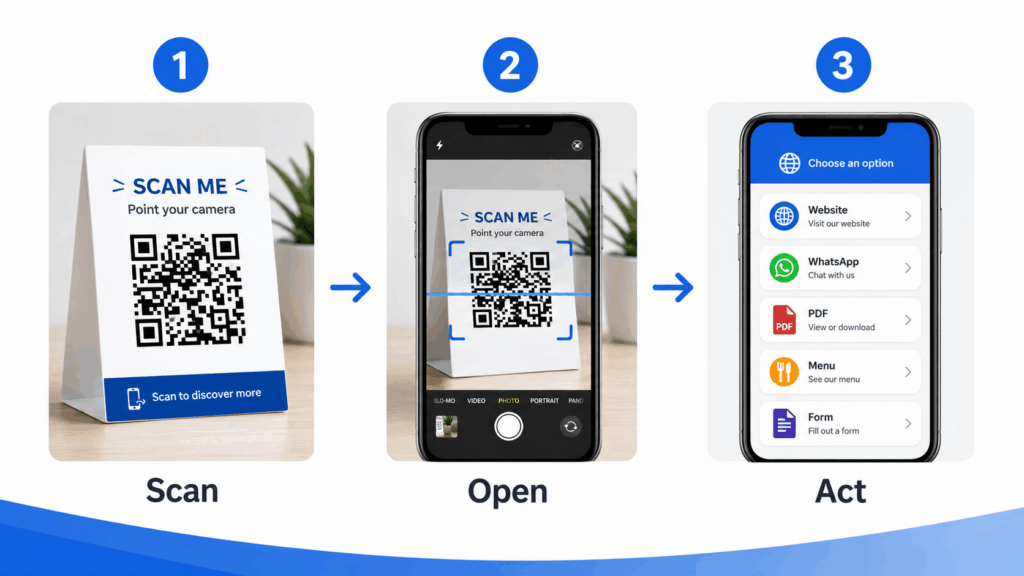
A QR code works by storing information inside a pattern that phones and scanners can read. When your phone scans the pattern, it reads the information and opens the connected destination. That destination may be a website, WhatsApp number, PDF file, form, location, contact card, payment page, menu, document, or another digital action.
Think of a QR code like a digital doorway. The printed code is the door. Your phone camera is the key. The online destination is the room it opens.
This is why QR codes are useful. They help people take action without stress. A flyer can lead to a WhatsApp chat. A product label can lead to usage instructions. A church program can lead to a donation page. A school notice can lead to an admission form. A restaurant table card can lead to a menu. A real estate signboard can lead to a property brochure.
The QR code connects physical attention to digital action.
Why Are QR Codes Becoming More Common?
QR codes are growing because people now see things offline but take action online.
A customer sees your flyer but wants to message you on WhatsApp. A guest sees your event poster but needs to register online. A parent visits your school but wants the admission form on a phone. A restaurant customer sits at a table but wants the menu without waiting for a waiter. A buyer sees a property signboard but wants more pictures before calling the agent.
In the past, businesses printed long links, phone numbers, email addresses, and instructions. That forced customers to do too much work. QR codes make the journey easier.
They also work well because smartphones are now part of everyday life. Many people already use their phones for WhatsApp, mobile banking, social media, online forms, shopping, directions, and communication. QR codes fit naturally into that behaviour.
A QR code is not just a technology trend. It is a convenience tool.
What Is QR Code Used For?
A QR code can help with almost any situation where you want someone to move from a physical object to digital information.
Individuals can use QR codes to share contacts, portfolios, wedding invitations, event details, personal websites, social media pages, payment instructions, and digital profiles.
Businesses can use QR codes to help customers open menus, message on WhatsApp, view products, download catalogues, fill forms, register for events, access discounts, follow social media pages, save contact details, read product information, or submit feedback.
Organizations can use QR codes to manage attendance, collect responses, share documents, verify IDs, distribute learning materials, guide visitors, support donations, and connect field workers to records.
The best way to understand QR codes is to see them as bridges. Whenever you need to move someone from paper, packaging, signboard, table, wall, card, badge, uniform, product, or physical location into a digital action, a QR code can help.
QR Code for WhatsApp
One of the easiest ways to use a QR code is to connect people to WhatsApp.
Many customers prefer WhatsApp because it feels familiar. They want to ask questions, place orders, send proof of payment, check availability, request delivery, or talk to a real person.
A WhatsApp QR code can open a chat directly with your number or business account. You can place it on flyers, product packaging, receipts, business cards, posters, delivery bags, social media graphics, banners, and shop counters.
A food vendor can print a WhatsApp QR code on takeaway packs. A fashion designer can place it on business cards. A real estate agent can add it to property flyers. A spare parts seller can place it on a shop poster. A consultant can use it during networking.
The customer scans and starts a conversation. That small step can increase enquiries because people no longer need to save your number manually.
QR Code for Business Cards
A normal business card has limited space. It may carry your name, phone number, email, website, and address. But the person who receives it may still forget to save your contact.
A QR code can turn your business card into a digital contact card.
When someone scans it, they can open your contact details, WhatsApp, website, social media links, portfolio, booking page, or company profile. This works well for consultants, lawyers, real estate agents, salespeople, contractors, entrepreneurs, designers, doctors, event planners, politicians, pastors, teachers, and professionals who meet people often.
Instead of handing out a card and hoping the person types your details later, you make it easier for them to act immediately.
A business card QR code also helps you look more professional. It tells people that your business is organized, accessible, and ready for digital communication.
QR Code for Restaurant Menus
Restaurants, cafés, lounges, hotels, bars, bakeries, and food vendors can use QR codes for digital menus.
Instead of printing new menus every time prices change, a restaurant can place QR menu cards on tables. Customers scan the code and view the menu on their phones.
This helps food businesses that update prices, add seasonal meals, remove unavailable items, or promote new packages. A QR menu can reduce printing costs and make updates easier.
It can also connect customers to WhatsApp ordering, Instagram pages, delivery instructions, customer reviews, or payment information.
For small food businesses, a QR menu does not need to be complicated. It can begin with a simple PDF menu, webpage, or WhatsApp catalogue. What matters is that customers can scan and view it easily.
QR Code for PDFs and Documents
Many businesses and organizations share documents every day.
Company profiles, product catalogues, school admission forms, church programs, NGO reports, price lists, brochures, real estate documents, training materials, event programs, and policy documents can all become easier to share with QR codes.
Instead of printing many pages or asking people to request the file later, you can place a QR code on a flyer, poster, business card, banner, or front desk notice. When people scan it, they open the document.
This works especially well at exhibitions, conferences, trade fairs, school open days, church events, training programs, and business meetings.
A QR code can turn one printed page into access to a full digital document.
QR Code for Google Forms and Registration
Google Forms and online forms are now common for registration, feedback, attendance, surveys, applications, and data collection.
A QR code can make forms easier to access.
A school can use one for admission enquiries. A church can use one for membership registration. An event planner can use one for guest registration. A training company can use one for attendance. An NGO can use one for field data. A business can use one for customer feedback.
Instead of sharing a long form link in a WhatsApp group or asking people to type it from a poster, place the form inside a QR code.
This works well at physical locations. You can place the QR code on a banner, desk sign, classroom wall, conference table, church notice board, or event entrance. People scan and fill the form immediately.
QR Code for Payments and Donations
QR codes can also help with payment instructions, donations, and checkout support.
A shop can place a QR code at the counter to open payment details. A church can place one on a program booklet for giving or donations. An event organizer can use one to guide people to ticket payment instructions. A school can use one to direct parents to fee payment information. A fundraiser can place one on posters and social media graphics.
The payment experience must remain clear and safe. Businesses should use trusted payment systems, correct account details, and simple instructions. A QR code should reduce confusion, not create it.
For many businesses and organizations, payment QR codes can support cashless transactions, donations, subscriptions, ticket sales, and customer convenience.
QR Code for Product Labels
Product sellers can use QR codes on labels and packaging.
A QR code on a product can lead customers to ingredients, usage instructions, authenticity checks, warranty registration, product videos, customer support, social media pages, or reorder links.
This can help food products, cosmetics, fashion items, electronics, household goods, agricultural products, books, event merchandise, handmade items, and locally manufactured goods.
A small product label may not have space for everything. A QR code solves that by opening a full digital page.
QR Code for Events
Events are one of the easiest places to use QR codes.
You can use QR codes for registration, ticket confirmation, program schedules, speaker profiles, venue maps, feedback forms, payment instructions, social media pages, photo galleries, attendance records, and post-event follow-up.
This works for weddings, conferences, seminars, church programs, school events, concerts, political meetings, business trainings, exhibitions, community meetings, and NGO workshops.
An event QR code can reduce paper handling and help guests find what they need faster.
One QR code at the entrance can lead to the event schedule. Another on the registration desk can lead to a check-in form. A final QR code at the end can collect feedback.
QR Code for Schools and Training Centers
Schools, universities, tutorial centers, training firms, and education consultants can use QR codes in many practical ways.
A school can link parents to admission forms, students to learning materials, visitors to school brochures, attendees to feedback forms, staff to attendance sheets, and graduates to certificate verification pages.
You can place QR codes on notice boards, ID cards, flyers, result slips, event programs, classroom materials, and admission banners.
This saves time and reduces repeated explanations. Instead of telling people to visit a website and search for the right form, the school can simply say, “Scan this code.”
For many parents and students, that is easier.
QR Code for Churches, Mosques, and Religious Organizations
Religious organizations can use QR codes for programs, giving, membership forms, event registration, sermon notes, announcements, counselling forms, volunteer sign-up, livestream links, and community updates.
A church can place QR codes on weekly bulletins, banners, envelopes, screens, posters, and event materials. A mosque or faith-based organization can use QR codes to share announcements, donation details, study materials, or registration forms.
This does not replace human connection. It simply makes information easier to access.
For large congregations, QR codes can reduce queues, paper waste, and repeated administrative work.
QR Code for Real Estate
Real estate agents and property developers can use QR codes to share property details quickly.
A QR code on a property signboard can lead to photos, videos, price details, location maps, inspection booking forms, WhatsApp enquiries, or a digital brochure.
This works because buyers often see property signs while passing by. They may not want to call immediately, but they may scan the code and save the information.
Agents can also place QR codes on flyers, business cards, site banners, inspection forms, and property brochures.
A good QR code can turn passing interest into a real lead.
QR Code for Asset Tracking and Inventory
Businesses can also use QR codes internally.
A company can place QR code labels on laptops, printers, furniture, machines, tools, vehicles, medical equipment, school assets, warehouse items, office devices, and inventory.
When staff scan the code, they can open information about the item, such as asset number, location, owner, purchase date, warranty status, maintenance record, or assignment history.
This helps schools, hospitals, hotels, offices, warehouses, NGOs, government contractors, churches, factories, and facility managers. Asset QR codes help organizations reduce confusion, improve record keeping, and manage physical items better.
Do QR Codes Have to Be Square?
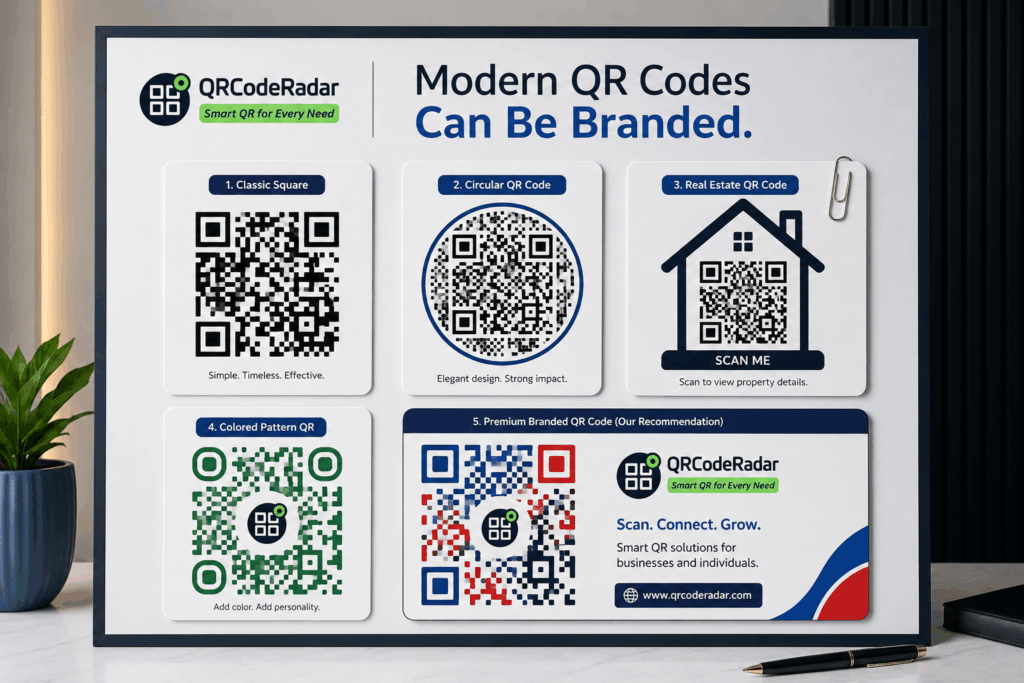
Traditionally, QR codes appeared as black-and-white square patterns. That is still the most common format, and it remains the safest style for basic scanning.
But modern QR codes can now look more attractive.
Today, businesses can create QR codes with colours, logos, frames, rounded edges, circular layouts, dots, custom patterns, and brand-friendly designs. Some QR codes appear inside circles. Others use soft corners, polygon-style frames, or branded shapes. A restaurant may use a QR code with a menu frame. A fashion brand may use a stylish QR code with its logo in the middle. A corporate brand may use blue, black, gold, or other brand colours instead of plain black.
However, design must never destroy function.
A QR code can look beautiful, but it still needs to scan quickly. The contrast must remain strong. The code must have enough clear space around it. The logo must not cover important scanning areas. The size must fit the distance from which people will scan. The designer must test it on different phones before printing.
So, yes, QR codes can now come in creative shapes and styles, including circles, rounded designs, frames, and branded layouts. But the best QR code is not the most decorative one. The best QR code is the one that looks good and scans without stress.
Static QR Code vs Dynamic QR Code
Not all QR codes work the same way. The two main types are static QR codes and dynamic QR codes.
A static QR code contains fixed information. Once you create it, the destination cannot change. If you print it on flyers and later discover a wrong link, you may need to reprint the materials.
A dynamic QR code gives you more flexibility. It allows you to update the destination later without changing the printed QR image. This helps businesses because links, menus, forms, documents, campaigns, and contact details can change.
A restaurant can update its menu link. A school can change its admission form. A real estate agent can update a property brochure. An event organizer can change registration details. A business can correct a link mistake after printing.
If you only need a QR code for personal or temporary use, a static code may be enough. If you plan to print the QR code or use it for business, a dynamic QR code is usually the safer choice.
Why Businesses Should Not Treat QR Codes as Decoration
Many people add QR codes to designs without thinking through the customer experience.
They place a QR code on a flyer, but the code looks too small. They add it to a business card, but the design leaves no clear space around it. They put it on a poster, but the background makes scanning difficult. They link it to a slow website. They forget to test it before printing. They use a free static code for something that may need updates later.
A QR code should not act as decoration. It must work.
Before you print any QR code, test it. Scan it with different phones. Check the link. Make sure the destination opens well on mobile. Confirm that the code size suits the print material. Keep enough clean space around it. Avoid placing it too close to the edge of a design.
A QR code that does not scan easily can frustrate customers and waste your printed materials.
Are QR Codes Safe?
QR codes are generally safe when trusted people and businesses create them properly. The risk comes from careless or dishonest use.
A QR code can hide a link, so people should avoid scanning codes from suspicious sources. Businesses should also make sure their own QR codes lead to trusted pages, clear instructions, and secure destinations.
For business owners, safety means control. You should know where the code leads. You should test it. You should avoid confusing customers with unknown third-party pages. You should make the destination look professional and trustworthy.
For customers, safety means checking the link before opening it, avoiding strange payment requests, and scanning codes only from trusted places.
QR codes are useful, but like every digital tool, they need responsible use.
How to Scan a QR Code
Most smartphones can scan QR codes easily.
On many phones, you only need to open the camera and point it at the QR code. A link or notification will appear on the screen. Tap it, and the destination opens.
Some phones may require Google Lens or a QR scanner feature. On iPhones, the camera usually reads QR codes directly. On many Android phones, the camera app or Google Lens can scan QR codes.
If your phone does not scan the QR code, check your camera settings, use Google Lens, or try a trusted QR scanner app.
For businesses, remember that not every customer is tech-savvy. If your audience includes older customers, parents, visitors, or first-time users, add a short instruction near the code, such as “Open your camera and scan.”
How to Create a QR Code
Creating a QR code starts with one question: what do you want the person to do after scanning?
Do you want people to open your website? Message you on WhatsApp? Download a PDF? Fill a form? View a menu? Save your contact? Make a payment? Register for an event? View product information?
Once you know the purpose, you can create the QR code and connect it to the right destination.
For simple personal use, a basic generator may be enough. For business use, think carefully about branding, editing, tracking, print quality, and customer experience.
A professional QR code service like QRCodeRadar can help you set it up properly, especially if you want the QR code to appear on printed materials, business cards, flyers, menus, product labels, event banners, payment displays, or organizational documents.
How QRCodeRadar Helps Individuals, Businesses, and Organizations
QRCodeRadar helps individuals, businesses, and organizations create QR codes for real use, not just quick downloads.
We help you create QR codes for websites, WhatsApp, PDFs, menus, Google Forms, events, product labels, contact cards, payment instructions, social media pages, business profiles, customer feedback, asset tracking, and more.
Our goal is to make QR codes easier, safer, and more useful. We help you think through the purpose, destination, design, file format, scan experience, and practical use of the code.
Whether you are a student, freelancer, restaurant owner, school administrator, church leader, real estate agent, event planner, retailer, consultant, NGO worker, product seller, or small business owner, there is likely at least one place where a QR code can save time, reduce friction, improve presentation, or help people reach you faster.
Simple QR Code Ideas You Can Try Today
If you are wondering how to start, begin with one simple use.
Put a QR code on your business card so people can save your contact. Add one to your flyer so customers can message you on WhatsApp. Place one on your restaurant table so customers can view your menu. Add one to your product label so buyers can learn more. Use one on an event banner so guests can register. Place one on a church program so members can access announcements. Add one to a school notice so parents can fill a form. Use one on a real estate signboard so buyers can view photos.
You do not need to start with a complicated system. Start with one problem that wastes time, causes confusion, or makes people work too hard. A QR code may be the easiest way to solve it.
Why QR Codes Matter
A QR code is a simple tool, but it can do a lot.
It can turn a flyer into a website visit. It can turn a business card into a saved contact. It can turn a restaurant table into a digital menu. It can turn a poster into an event registration page. It can turn a product label into a customer information page. It can turn a school notice into an online form. It can turn a church program into a donation or announcement page. It can turn a real estate signboard into a property brochure.
The value of QR codes is not in the technology alone. The value is in convenience. QR codes help people act faster, connect easier, and access information without stress.
If you already use flyers, business cards, WhatsApp, forms, menus, catalogues, events, products, documents, or payment instructions, you likely have a good reason to try a QR code.
QRCodeRadar can help you create a professional QR code that fits your purpose and works properly in the real world.
Need a QR code for your business, menu, flyer, payment instruction, PDF, Google Form, event, product label, asset tag, WhatsApp link, social media page, or business card?
QRCodeRadar helps individuals, Nigerian businesses, African brands, schools, churches, events, restaurants, and organizations create professional, branded, editable, and trackable QR codes built for real-world use.
Start your professional QR code setup today with QRCodeRadar.
QR Code Frequently Asked Questions
What is QR code in simple words?
A QR code is a scannable code that opens digital information on a phone. It can open a website, WhatsApp chat, PDF, menu, form, payment instruction, contact card, social media page, location map, video, or other online destination.
What does QR code mean?
QR code means Quick Response code. It helps people access information quickly by scanning with a phone.
What is a QR code used for?
A QR code can be used for websites, WhatsApp chats, business cards, restaurant menus, PDFs, Google Forms, event registration, payment instructions, product labels, school forms, church programs, real estate brochures, social media pages, and asset tracking.
Who invented the QR code?
DENSO WAVE released the QR Code in 1994. It started as a way to handle product and manufacturing information more efficiently, then expanded into business, marketing, payments, documents, events, and everyday use.
Do QR codes have to be black and white?
No. QR codes can now use colours, logos, frames, rounded edges, circles, dots, and custom designs. However, the design must still scan properly. A beautiful QR code that does not scan well is not useful.
Can a QR code be circular?
Yes, some modern QR code designs use circular frames, rounded patterns, or creative layouts. The important thing is to preserve the readable parts of the QR code and test it before use.
How do I scan a QR code?
Open your phone camera and point it at the QR code. If your phone supports QR scanning, a link will appear. Tap the link to open it. Some phones may require Google Lens or a trusted QR scanner app.
Do I need an app to scan a QR code?
Many modern smartphones can scan QR codes with the camera. If your phone does not scan directly, you can use Google Lens or a trusted QR scanner app.
What is the difference between static and dynamic QR codes?
A static QR code has a fixed destination that cannot change after creation. A dynamic QR code allows you to update the destination later without changing the printed QR code.
Which QR code is better for business?
A dynamic QR code is usually better for business because it gives you flexibility. You can update links, forms, menus, documents, campaigns, or contact details after printing.
Are QR codes safe?
QR codes are safe when they come from trusted people or businesses and lead to clear, secure destinations. Users should avoid scanning suspicious codes, and businesses should make sure their own QR codes lead to trusted pages.
Can QRCodeRadar create a QR code for me?
Yes. QRCodeRadar helps individuals, businesses, schools, churches, restaurants, events, real estate agents, product sellers, NGOs, and organizations create professional QR codes for websites, WhatsApp, PDFs, menus, Google Forms, events, product labels, payment instructions, business cards, documents, and more.